
A monthly reading plan for a TBR you can actually use
Plan your next reads in Bookleap for iPhone. Pick books for a month, reorder your TBR and follow completed titles without rebuilding your library.
Monthly planning described here is available in the iOS app. Some features require Premium.
By the Bookleap team · Updated
How Bookleap helps you read
Keep your whole library, but give the next month a smaller reading list. Bookleap on iPhone lets you choose books for a particular month, put them in your preferred order and see how many you have finished. A reading plan selects titles; reading goals set your targets.
Separate next month from someday
A large TBR is useful for collecting ideas, but less helpful when you only want to choose tonight’s book. A monthly plan gives a small group of titles a clear place without removing anything from the library.
Mix a long novel with a shorter book or reserve space for a book-club pick. You choose the titles, so a plan can reflect your interests rather than an algorithm’s recommendations.
Choose an order and watch completion
Add books from your existing library, reorder the list and check the completed count for that month. Moving between months lets you work with a specific period instead of one endless list.
Your book remains the same library entry, with its status, notes and sessions. Planning does not require creating another copy of its reading history.
Pair the plan with a realistic goal
The plan answers which books you want to read. A book or time goal answers how much you want to read. Use both when helpful, and adjust your selection when a book takes longer than expected.
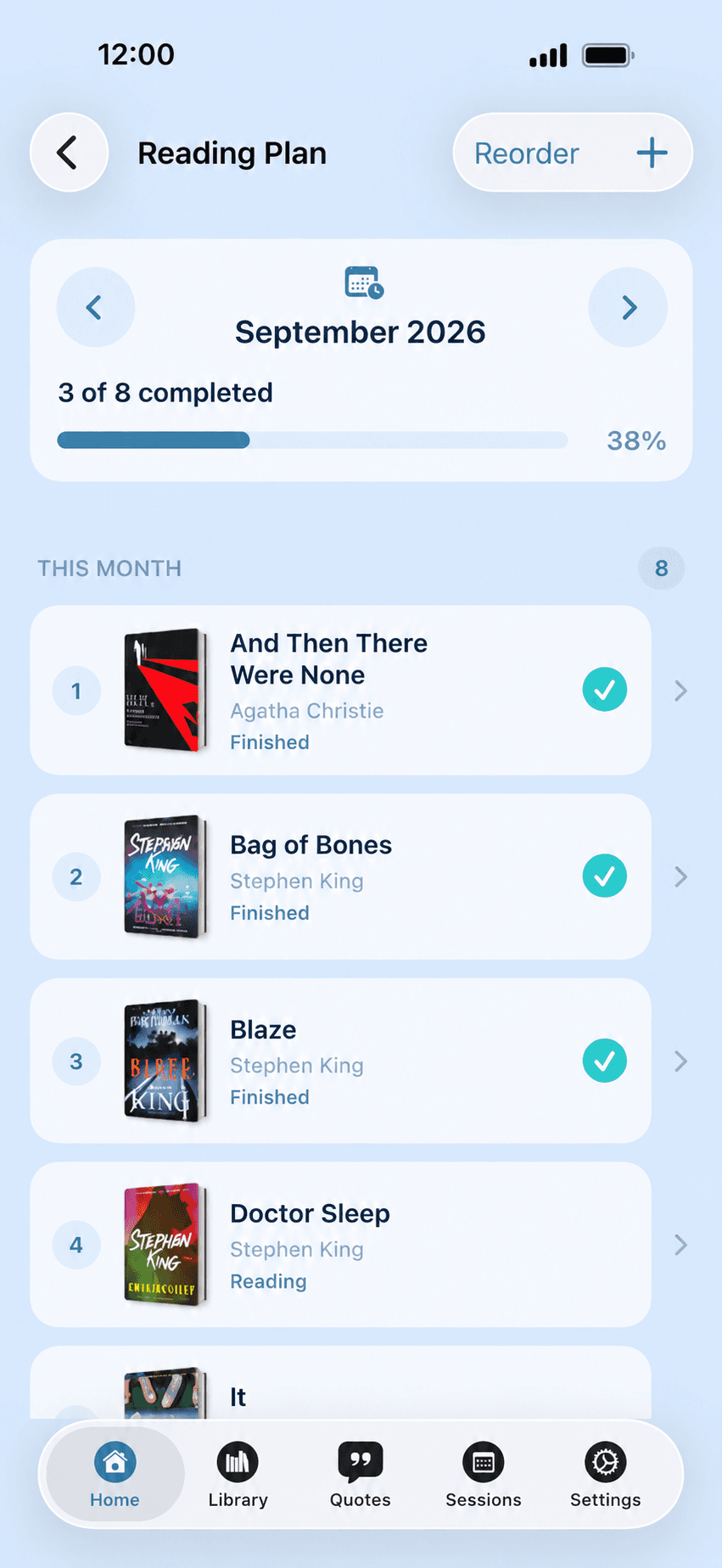
Give your next month a short reading list
Choose a few books you already own and make them easy to return to.
Monthly planning described here is available in the iOS app. Some features require Premium.
Getting started with monthly reading plan
Choose a month
Open the reading plan and move to the month you want to organize.
Select library books
Add the titles you want to read and arrange their order.
Read and review
Update book statuses as you finish, then review the month’s completed count.
An everyday example
For December, choose one book-club novel, one nonfiction book and a short story collection. Put the club book first and keep the other two as options. Your library still holds every other recommendation for later.
Questions and answers
How is a monthly plan different from a TBR?
A TBR can hold every book you hope to read. A monthly plan selects a smaller group for a particular month.
Can I change the order?
Yes. The iOS reading plan lets you reorder the selected books.
Does a plan create duplicate books?
The plan selects books from your library rather than asking you to enter each title again.
Is this a strict daily reading schedule?
It is a monthly book selection, not a promise that every title will be finished or an automatic daily timetable.
Give your next month a short reading list
Choose a few books you already own and make them easy to return to.
Monthly planning described here is available in the iOS app. Some features require Premium.